
BenchForge: comparing AI models without dogma
BenchForge is an open source tool that Kintsugy contributes to, for comparing AI models on real use cases. The goal: test prompts, measure costs, analyze answer quality and decide with facts rather than impressions.
- Published on
- Updated on
- Author
- Alexis Soltysiak
- Reading time
- 11 min read
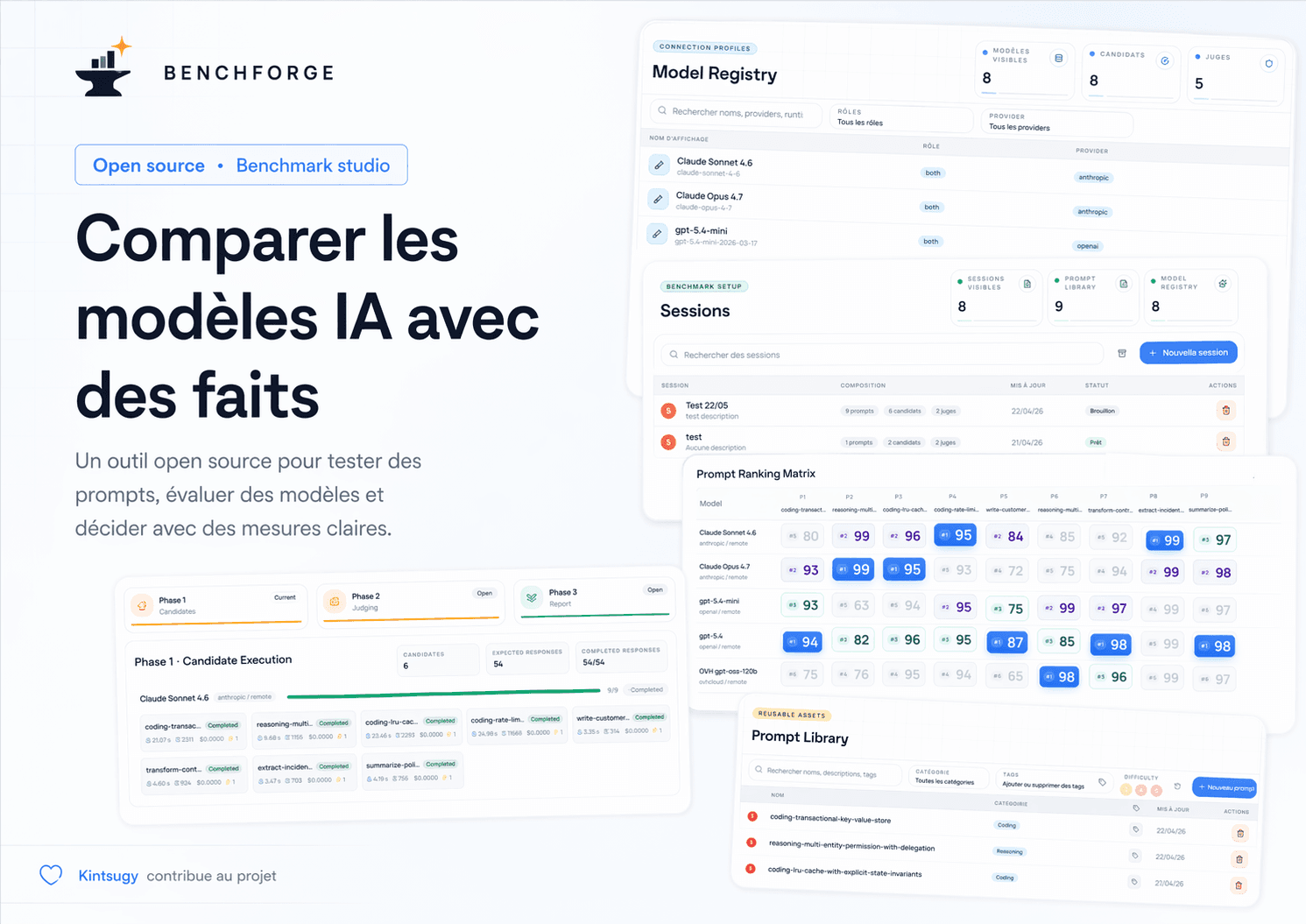
Comparing AI models without dogma: why Kintsugy contributes to BenchForge
The AI ecosystem moves at a pace that is hard to keep up with. Every week, new models appear, public benchmarks evolve, costs change, and local architectures become more and more credible.
Yet in many teams, one question keeps coming back: which model should we use, for which use case, and at what real cost?
The debate often pits two reflexes against each other. On one side, using the biggest model available “to be safe”. On the other, switching to local or open source models to regain control. In both cases, the risk is the same: deciding on impressions rather than on measurements.
The real issue is not just performance
AI models are often discussed in terms of raw capability: reasoning, context size, speed, generation quality, cost per token. These metrics are useful, but they are not enough.
In a project, a model has to be evaluated on concrete cases: classification, extraction, summarization, business reasoning, rewording, structured generation, document analysis or decision support.
Critical point
A model that excels on a general benchmark can be mediocre on a specific business case. Conversely, a smaller model can be more than enough if the need is well defined.
So the right question is not:
What is the best model?
But rather:
What is the best trade-off for my use, my constraints and my budget?
BenchForge: testing instead of assuming
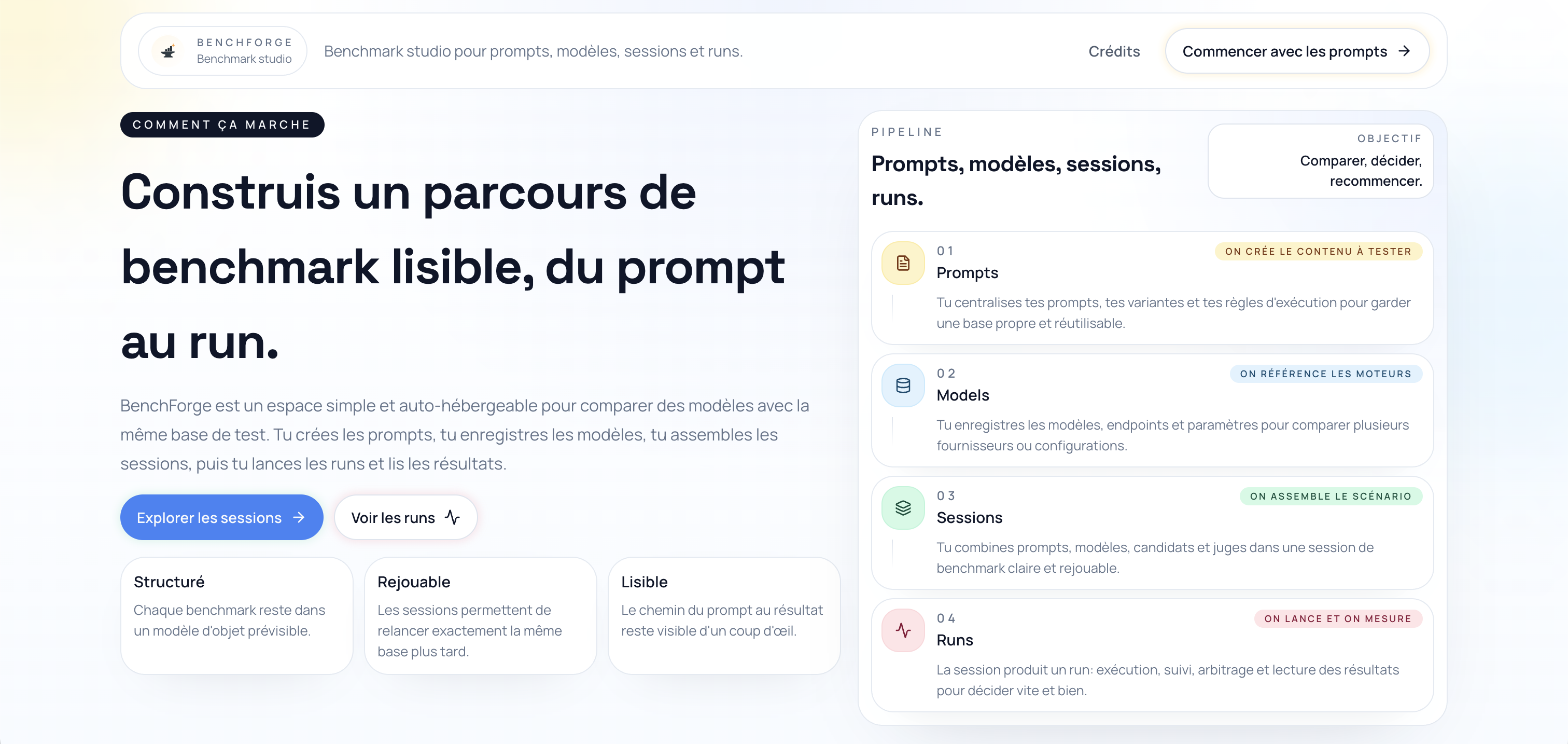
BenchForge lets you compare several models on the same set of prompts. The goal is simple: run the same tests, on the same inputs, with identical evaluation criteria, then produce a clear reading of the results.
BenchForge is an open source project that Kintsugy contributes to. It was born from a very concrete need: moving past theoretical discussions about AI models and building a reproducible basis for comparison.
The tool lets you manage a library of prompts, register different candidate models, run benchmark sessions, then consolidate the results into reports you can act on.
Key takeaway
BenchForge does not try to name a universally better model. It helps identify the most relevant model for a given context.
Why this comparison is becoming essential
Model choices now have a direct impact on costs, product performance, confidentiality, infrastructure and user experience.
Using a very powerful model for every request may feel comfortable. But if 80% of tasks can be handled by a smaller, cheaper or locally hosted model, the opportunity cost becomes significant.
Conversely, switching too quickly to a local open source model without serious measurement can create other problems: unstable quality, latency, hosting complexity or difficulty keeping performance steady over time.
Good practice
Before choosing a model, build a set of prompts that represents your real uses. The tests must reflect your production, not just generic examples.
BenchForge provides a simple framework to make these choices objective. You do not just compare model names. You compare answers, costs, latency, scores and behaviors on specific tasks.
First building block: a well-managed prompt library
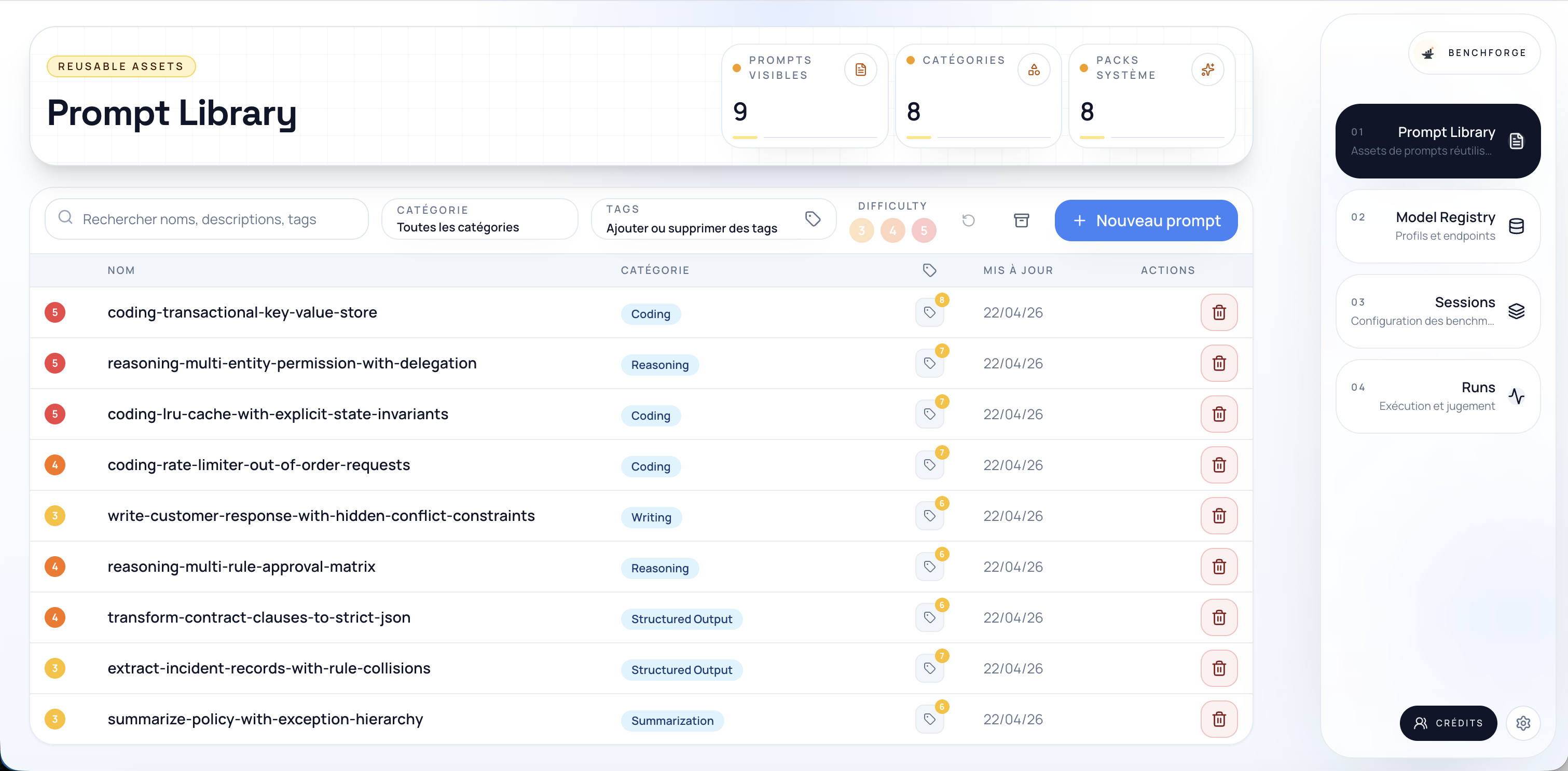
The Prompt Library centralizes the prompts to test, their categories, their tags and their status. It lets you gradually build a test base that is stable, maintainable and reusable.
In many AI projects, prompts live in scattered files, tickets, notebooks or directly in the code. That works at first, then quickly becomes hard to maintain.
BenchForge introduces a cleaner approach: prompts become test items in their own right. They can be categorized, filtered, tagged and replayed in different sessions.
This approach changes the way you work. You no longer test “a model” in a vague way. You test a model on a collection of explicit use cases.
As soon as a prompt is used to make a decision or produce a business output, it deserves to be tracked with the same rigor as a software component.
Second building block: a comparable model registry
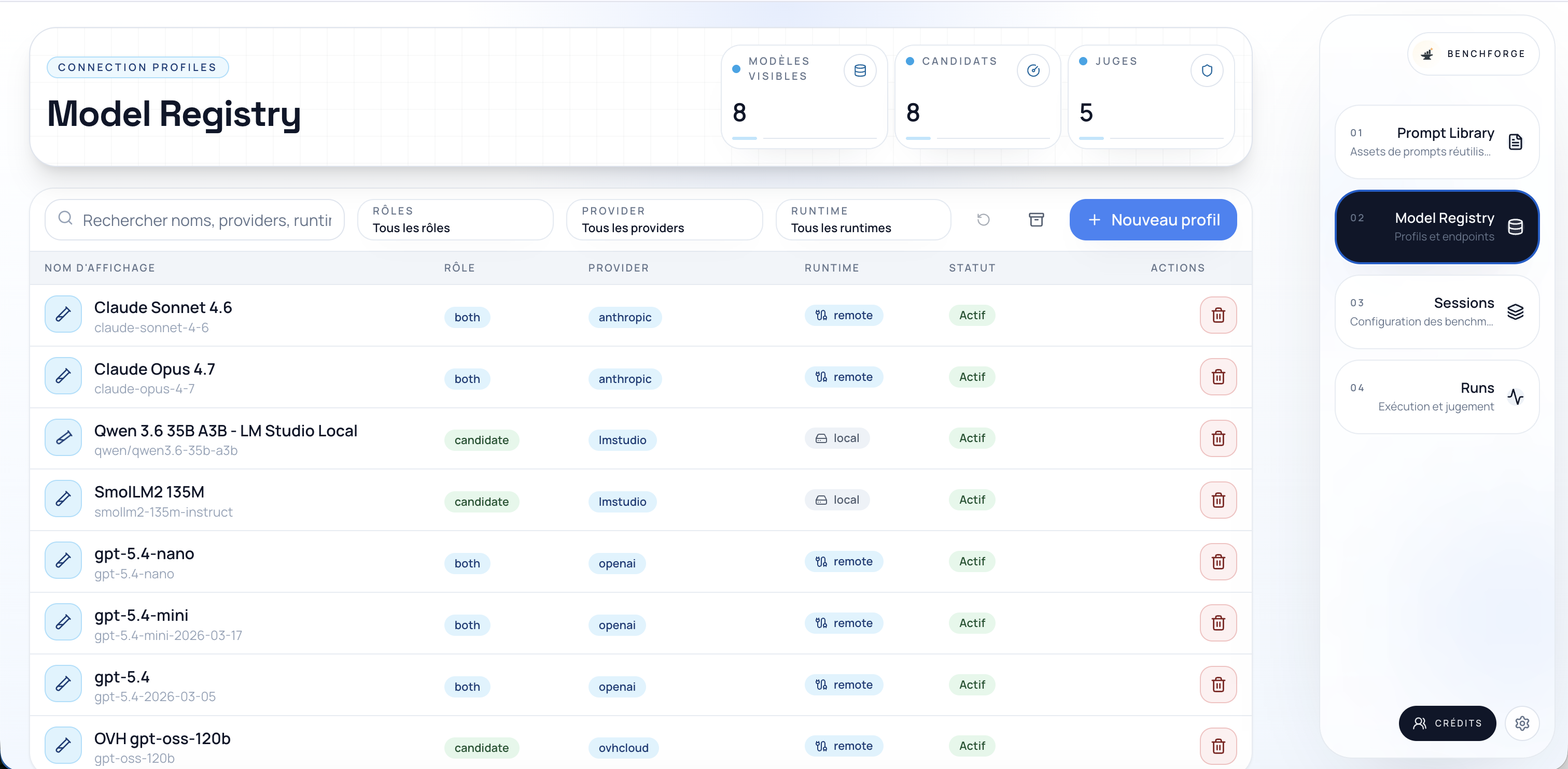
The Model Registry lets you declare the models to compare: proprietary models, open source models, local models, quantized variants or specific endpoints.
Choosing a model is no longer binary. Between large proprietary models, hosted open source models, local models, quantized variants and specialized endpoints, the combinations are many.
This is exactly where the model registry becomes useful. It sets a clear baseline: which models are tested, with which provider, which runtime, which status and which constraints.
This transparency matters, because two models with almost the same name can behave differently depending on their version, their quantization, their endpoint or their inference configuration.
Watch out
Comparing models without tracking their version, their provider and their configuration produces a benchmark that is hard to use.
Third building block: sessions to replay the tests
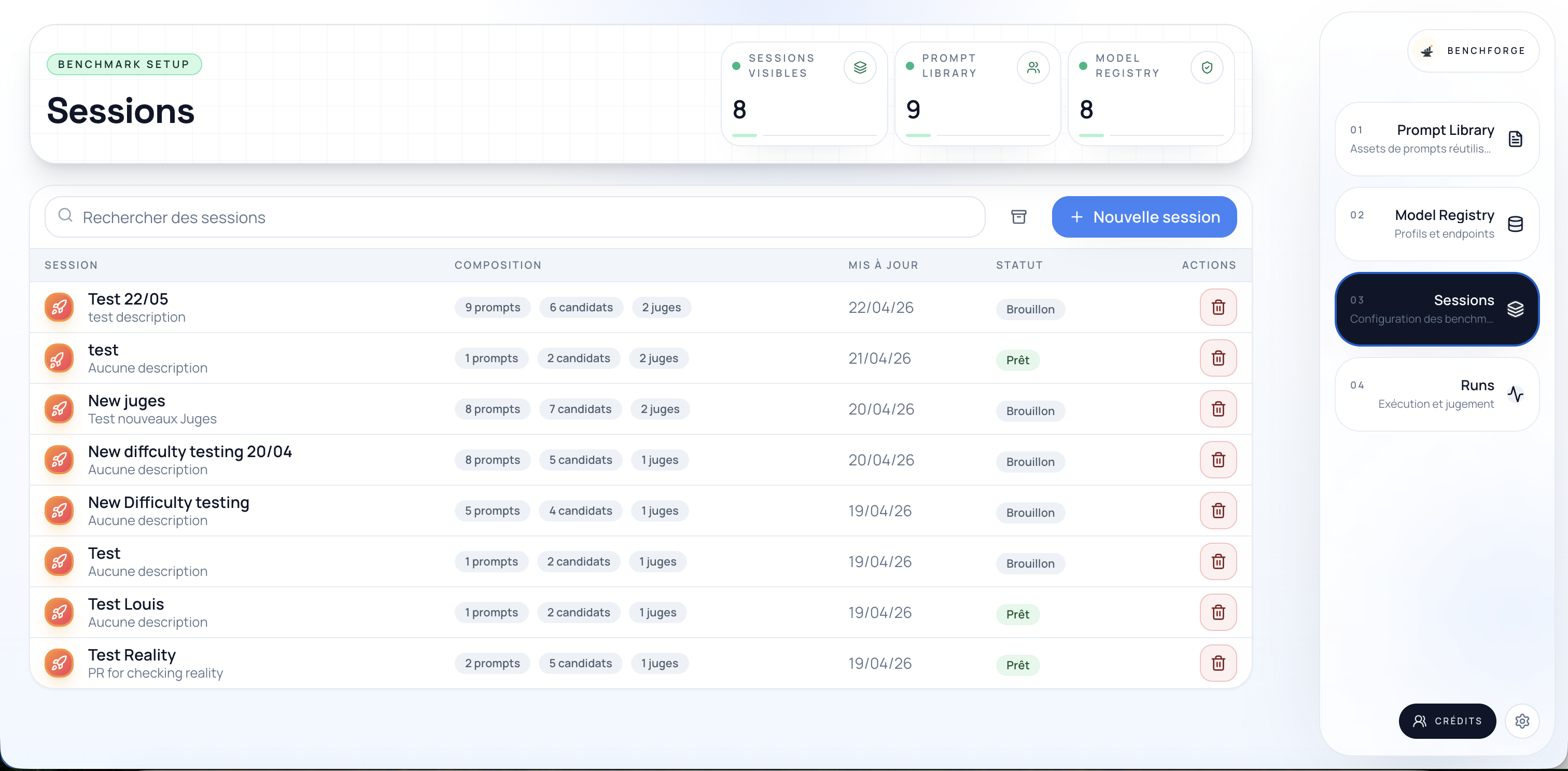
Sessions let you select a combination of prompts, candidate models and judges. They give the benchmark a clear structure and make comparisons over time easier.
A BenchForge session is a test protocol. It defines the prompts to run, the candidate models, the judge models and the comparison rules.
The benefit is twofold. First, the team knows exactly what was tested. Second, it can rerun a session later to check whether a new model, a new version or a new configuration really improves the results.
This logic is essential to industrialize AI. Models change. Prompts evolve. Costs move. Without a benchmark history, decisions quickly become subjective.
Key takeaway
A useful benchmark is not a one-off test. It is a basis for comparison that you can replay when models, prompts or constraints change.
Execution phase: look at the answers, not just the scores
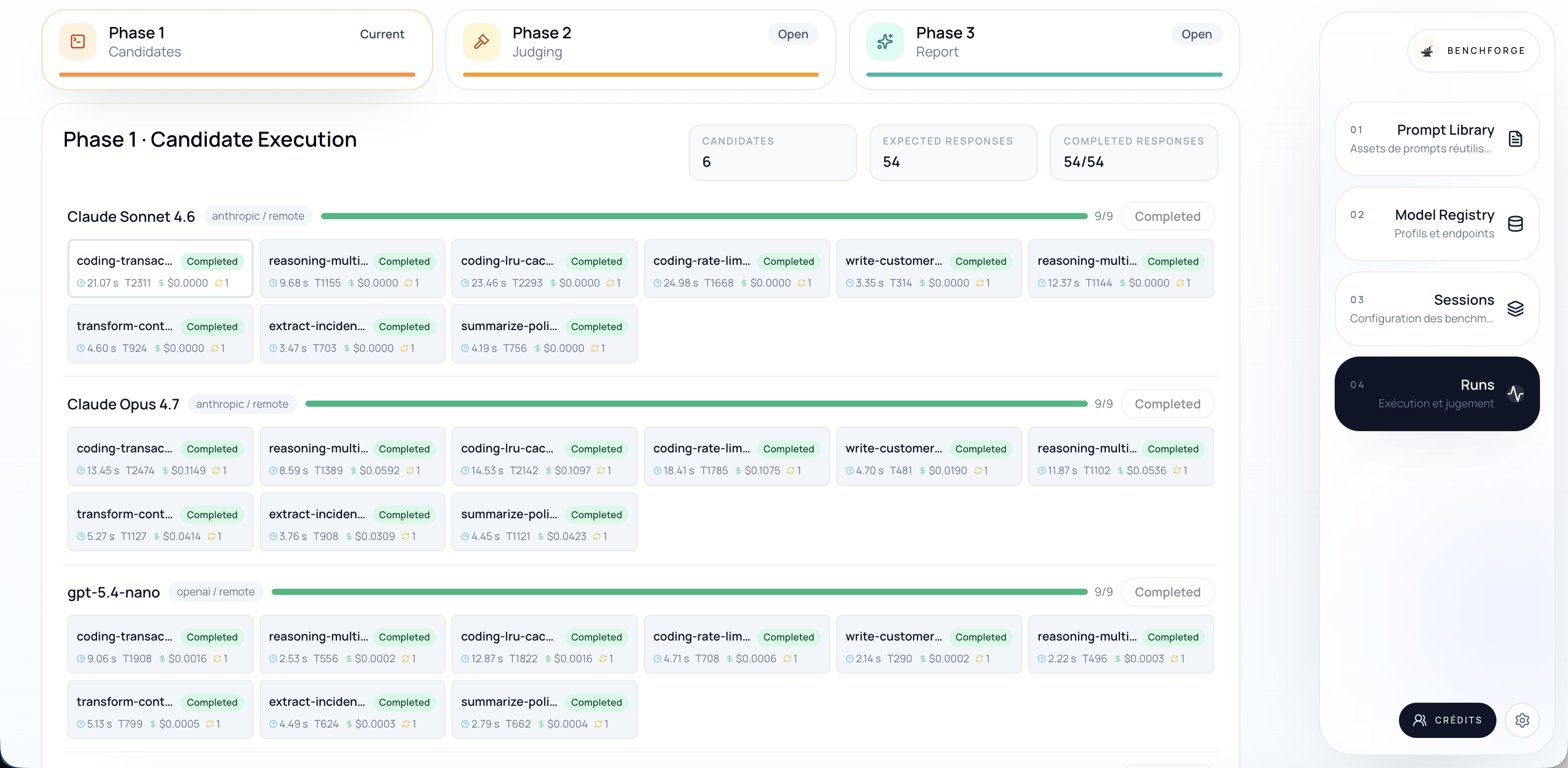
The execution phase lets you follow the candidates, the expected answers, the completed answers and the overall progress of the session.
The final score is useful, but it does not tell the whole story. Two models can get similar scores while behaving very differently.
One can produce short, fast and stable answers. Another can reason better, but at the cost of higher latency. A third can be relevant on simple tasks, but fail as soon as the prompt calls for stricter structure.
That is why BenchForge does not stop at a final table. The tool lets you follow the runs, look at the answers and understand why a model passes or fails on certain cases.
The point is not to make one model win. The point is to understand what each model does well, what it does less well, and under what conditions.
Reports: making trade-offs visible
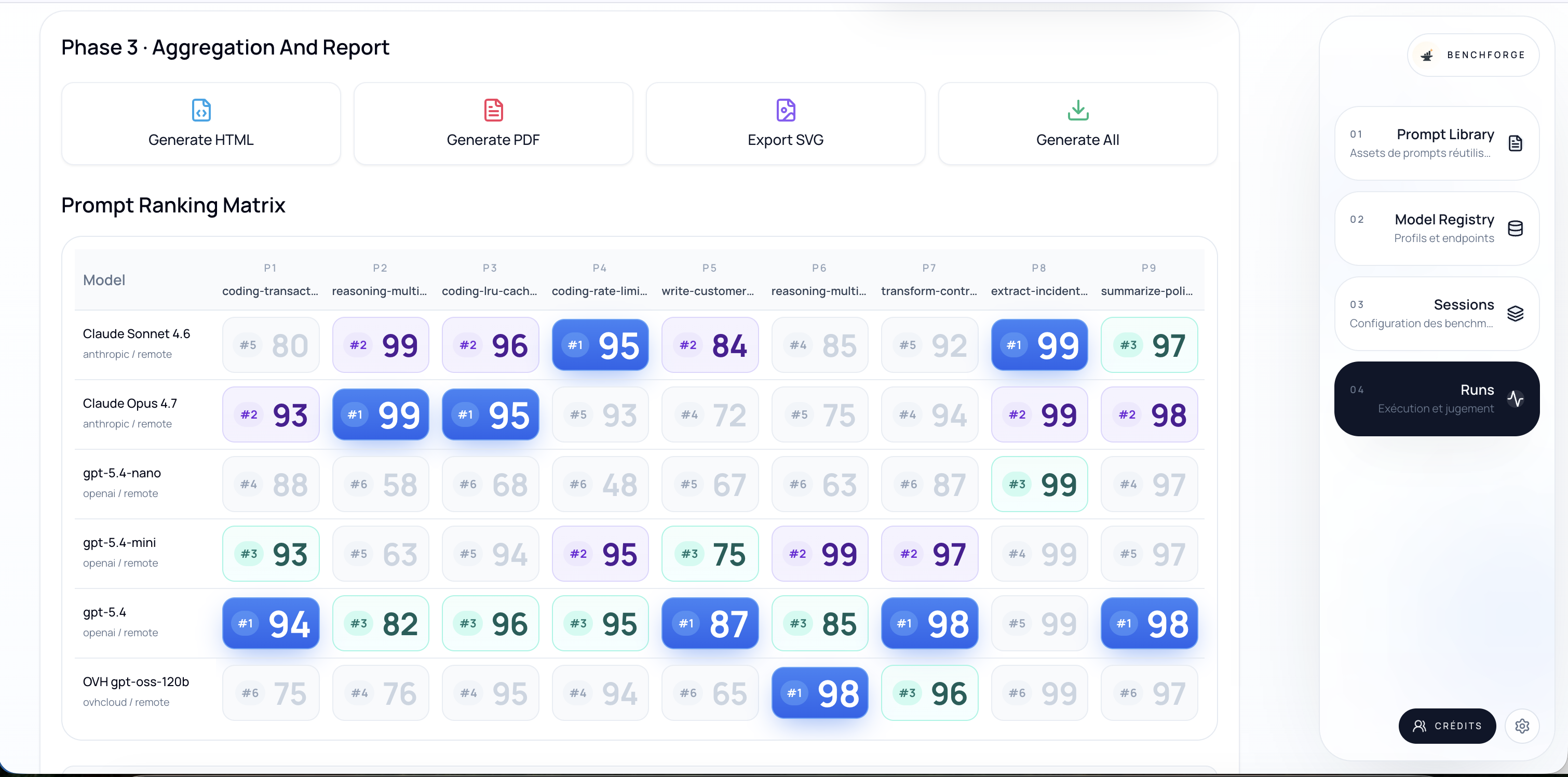
Reports let you visualize the results as a ranking matrix, read by model, by prompt and by evaluation criterion.
A benchmark only has value if the people who have to decide can understand it.
Technical teams need details. Product managers need to compare impacts. Leadership needs to understand the costs, the risks and the potential gains.
BenchForge generates reports you can act on, exportable as HTML, PDF or SVG. This keeps the choice of a model from coming down to personal preference or the trend of the moment.
Proprietary, open source, local
Multi-model comparison
HTML, PDF, SVG
Available exports
Decide with facts
Goal
The report does not replace business analysis. It provides a healthier basis for discussion. You can talk about cost, latency, quality, robustness and relevance with concrete evidence.
Cost, latency, quality: the triangle to balance
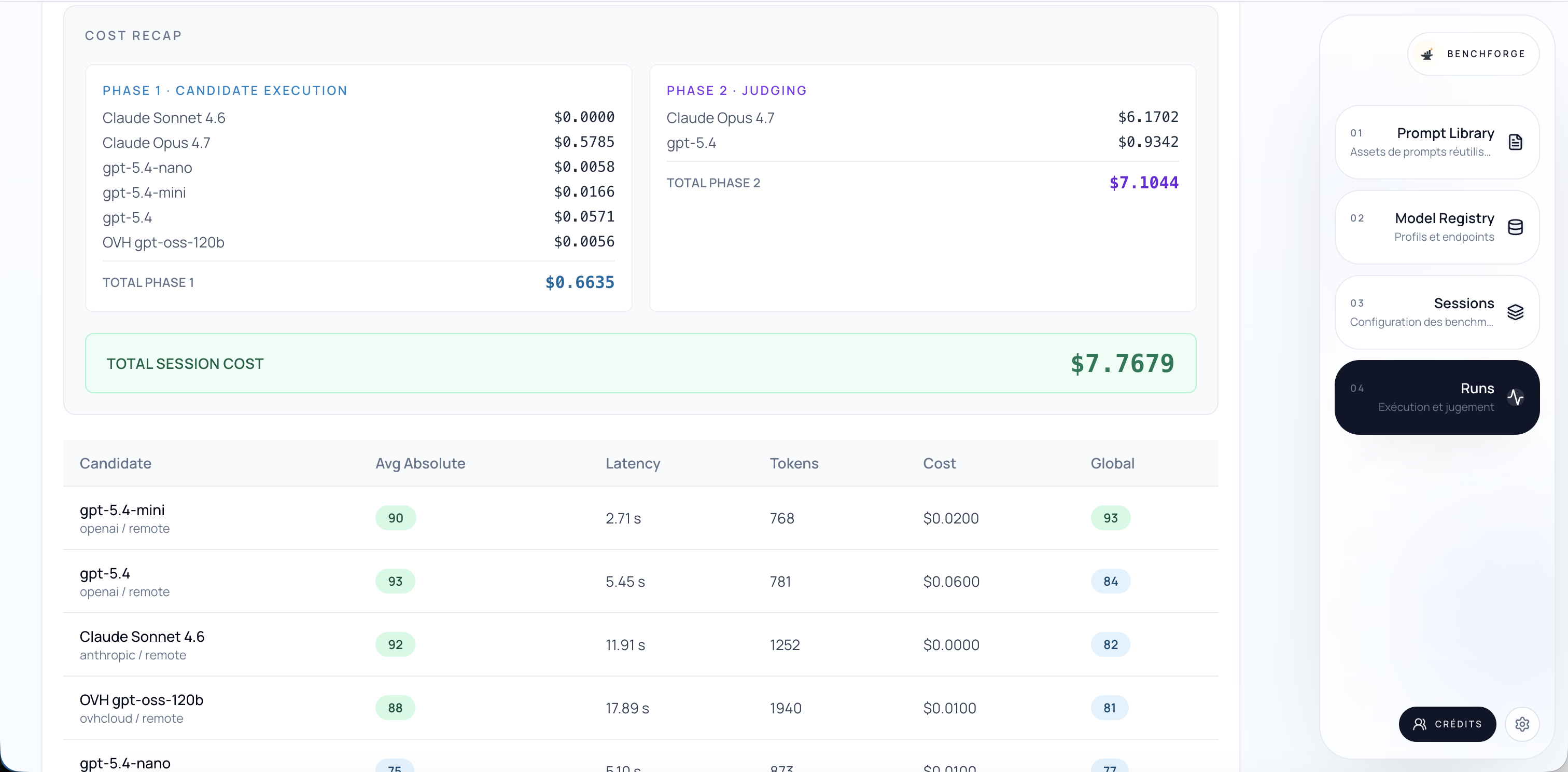
The cost and performance views help you understand the concrete impact of a model choice: total session cost, latency, tokens consumed and overall score.
In practice, choosing a model rarely comes down to a single criterion.
A very powerful model can be too expensive for repetitive tasks. A local model can be economically attractive, but require more infrastructure work. A lighter model can be perfect for some tasks, but fall short on complex cases.
BenchForge helps make these trade-offs visible. It lets you compare the cost of a session, the average latency, the volume of tokens and the quality of the answers.
Good practice
Do not look for a single model for every use. Map your AI tasks, then match each family of tasks with the level of model it really needs.
This logic matters most for AI products in production. At scale, a small difference in unit cost can become very significant.
A concrete case: do you really need a big model for every task?
Take a team that uses a very powerful model for all its AI requests: information extraction, summarization, document qualification, internal answer generation and decision support.
At first glance, this choice seems rational. The model is reliable, well known and easy to integrate. But after a few weeks, costs rise, latency becomes noticeable and some repetitive tasks do not really justify that level of power.
With BenchForge, the team can create a test session with its real prompts, then compare several options: a powerful proprietary model, a lighter model, a hosted open source model, and possibly a local model.
The result can vary a lot from one prompt to another. Some tasks will stay on a very powerful model. Others can move to a more economical model. Some can even run locally if confidentiality or cost become priorities.
You do not replace a model on principle. You choose the right level of power in the right place.
What open source changes in the approach
The value of an open source tool is not only economic. It is also methodological.
The benchmark becomes inspectable. Criteria can be adapted. Prompts can be enriched. Models can be added. Reports can evolve with the needs of a team, a product or an organization.
Why it matters
In a field where offerings change very fast, keeping control of your evaluation framework becomes as important as the choice of the model itself.
At Kintsugy, this logic resonates with us in particular. AI topics should not be treated only as technical demos. They have to be tied to product, business and economic decisions.
BenchForge fits this approach: experiment fast, but measure properly.
An approach for AI, product and data teams
BenchForge can be used in several contexts:
- selecting a model for a new use case;
- comparing a proprietary model with an open source alternative;
- measuring the impact of a prompt change;
- tracking a model's quality over time;
- documenting a technical or budget decision;
- testing different hosting strategies.
The benefit is especially strong for teams that are industrializing AI uses. Once prompts go into production, they need to be tested the way code is tested.
Good practice
Version your prompts, keep your benchmark results and replay your sessions regularly when you change models or configurations.
What we want to build with BenchForge
BenchForge is not meant to become yet another leaderboard. The goal is more pragmatic: provide a simple tool that helps teams make better decisions.
We want everyone to be able to test their own prompts, their own models and their own constraints.
No ready-made truth. No single answer. No magic promise.
Just a clearer method to answer a question that has become central:
Which AI model should you use, for which use, with what level of confidence and at what cost?
Conclusion: measure before you choose
The AI model market will keep fragmenting. Large proprietary models will remain essential for some uses. Open source models will keep improving. Local deployments will become more and more credible.
In this context, the value will not lie only in the choice of a model, but in the ability to compare quickly, cleanly and regularly.
BenchForge offers a concrete answer to this need. An open source, customizable tool focused on real use, which helps teams turn their intuitions into measured decisions.
Discover BenchForge
Test your prompts, compare your models and build your own benchmarks. Contributions are open and feedback from the field is welcome.
Is this topic relevant to you?
Let's discuss your context and how AI can address your challenges.